ERP Implementation Cost: A Realistic Budget Guide for SMEs
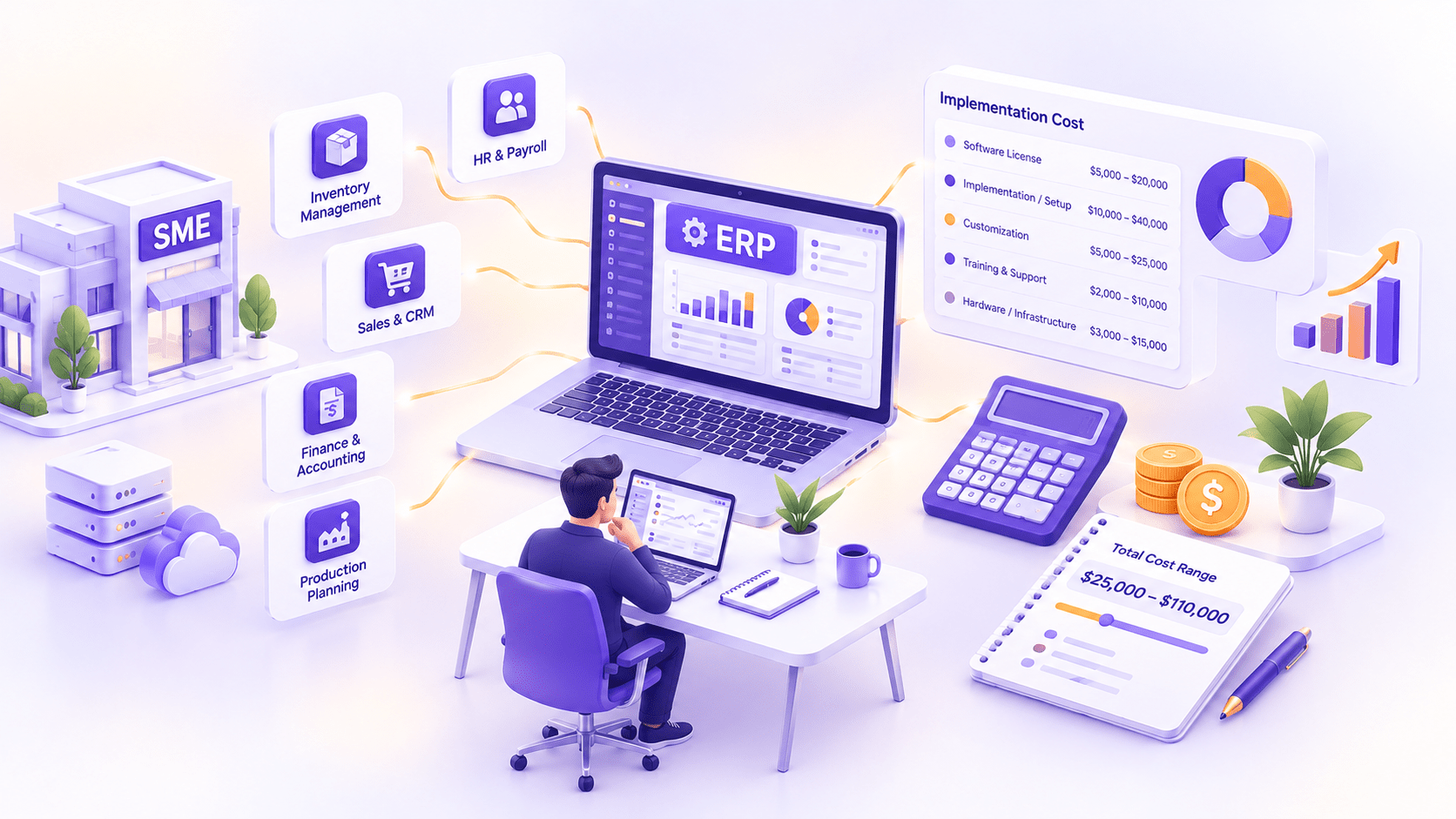
SME ERP implementations typically run $25,000 to $250,000 all-in, covering software, implementation partner fees, data migration, and training, with most growing businesses landing between $60,000 and $150,000 depending on platform and company size. The software license is rarely the biggest line item. Implementation, data migration, and change management usually cost more combined than the software itself, which is exactly where budgets that only price the license end up going wrong.
This guide breaks the full cost down by company size and platform, walks through the seven components that make up a realistic budget, explains why so many ERP projects run over that budget, and works through a real example so you can see how the pieces actually add up.
ERP Implementation Cost at a Glance
| Company Size | Odoo (all-in, first year) | SAP Business One (all-in, first year) | Custom ERP (all-in, first year) |
| Small SME (10–25 users) | $25,000–$60,000 | $60,000–$150,000 | $150,000–$300,000 |
| Mid-size (25–75 users) | $60,000–$150,000 | $150,000–$400,000 | $300,000–$600,000 |
| Larger SME (75–200 users) | $150,000–$350,000 | $400,000–$900,000+ | $600,000–$1,200,000+ |
These figures cover licensing and implementation for the first year, including data migration, basic customization, and training. They exclude ongoing annual support and license renewal, covered in the cost components below. As with any comparison across platforms, actual cost depends heavily on how much customization and how many integrations a given business needs, not company size alone.
It is worth reading this table as a starting range rather than a precise quote. Two businesses at the same headcount can land at opposite ends of their band depending almost entirely on how closely their existing processes match the platform's standard configuration and how clean their existing data is going in, which is exactly what the cost components below unpack in more detail.
The 7 Cost Components of an ERP Implementation
Software Licensing or Subscription
This is the most visible line item and usually the easiest to budget accurately, since most vendors publish per-user pricing. Odoo runs roughly $25 to $49 per user per month depending on tier, while SAP Business One runs $95 to $220 per user per month. Licensing is predictable, but it is worth remembering it typically represents only a fifth to a quarter of total first-year cost, not the majority most first-time buyers assume, and treating it as the whole budget is the single most common early planning mistake.
Implementation Partner Fees
This covers the actual work of configuring the system to your business: discovery, process mapping, configuration, and project management from your implementation partner. It is usually the single largest cost component, often exceeding the software license itself, and it scales with how much your processes deviate from the platform's standard configuration. Ask any partner to break this fee down by phase rather than accepting a single lump sum, since that breakdown is what lets you spot where a quote is thin on discovery time, a common source of later scope surprises.
Data Migration and Cleansing
Moving data out of spreadsheets, legacy systems, and disconnected tools into a single ERP is rarely as simple as an export-and-import. Data has to be cleaned, deduplicated, and mapped to the new system's structure, and the state of your existing data going in is one of the biggest, and most commonly underestimated, cost swings in the entire project. A business with years of inconsistent customer records or product codes across multiple spreadsheets should expect this line item to run meaningfully higher than the baseline range, and it is worth having someone actually sample your real data before finalizing a budget rather than estimating from a description of it.
Customization and Integrations
Any gap between your actual workflow and the platform's default configuration costs money to close, whether through custom fields, custom modules, or integrations with other systems you already run (accounting, e-commerce, industry-specific tools). The businesses that scope this honestly upfront, rather than discovering the gaps mid-project, tend to stay closest to their original budget. A useful discipline: list every existing system that needs to talk to the new ERP before requesting a quote, since an integration discovered after the contract is signed almost always costs more as a change order than it would have as part of the original scope.
Training and Change Management
A system nobody knows how to use properly delivers a fraction of its potential value, and training is easy to underbudget because it does not feel like "real" project work in the way configuration does. Budget for structured training sessions, documentation, and a change management plan that addresses how the new system changes people's day-to-day work, not just a single onboarding session before go-live. Panorama's research consistently identifies weak change management as one of the strongest predictors of a disappointing outcome, independent of which platform or implementation partner was involved.
Infrastructure/Hosting
Cloud-hosted ERP deployments (Odoo Online, SAP B1 Cloud) fold hosting into the subscription price, while on-premise or self-hosted deployments carry separate server, storage, and IT maintenance costs. Most growing SMEs are better served by a cloud deployment specifically because it avoids this cost category becoming a second, harder-to-predict budget line, though a business with strict data residency requirements or an existing on-premise infrastructure investment may find the calculation runs the other way.
Post-Go-Live Support
The weeks immediately after go-live typically need more support than steady-state operation, as real users hit real edge cases the testing phase did not fully anticipate. Budget for an elevated support period immediately following launch, distinct from your ongoing annual maintenance contract, since treating them as the same line item tends to underfund exactly the period when problems are most likely to surface. Ask your implementation partner explicitly how long their elevated post-launch coverage lasts before it reverts to standard support terms, and make sure that window matches how long your own team realistically needs to reach comfort with the new system.
What Does Each Phase Cost? (Timeline Budget Model)
A typical SME ERP implementation runs three to nine months and breaks down into recognizable phases, each with its own rough share of the total budget. Discovery and planning, mapping your current processes and defining requirements, typically accounts for 10 to 15 percent of the budget and takes two to six weeks. Design and configuration, where the system is actually set up against your requirements, runs 20 to 25 percent and takes four to ten weeks. Data migration typically runs 15 to 20 percent and overlaps with configuration, taking three to eight weeks depending on data quality.
Development and customization, building anything the standard configuration cannot handle, runs 15 to 20 percent and varies the most in timeline, from a couple of weeks for a light-customization project to several months for a heavily customized one. Testing typically accounts for 10 to 15 percent of the budget over two to six weeks, training and change management run roughly 10 percent spread across the final weeks before launch, and go-live plus the elevated post-launch support period accounts for the remaining 5 to 10 percent.
These percentages are a planning tool, not a guarantee. A project with clean existing data and minimal customization needs will lean more heavily toward configuration and training as a share of the total; a project with messy legacy data or unusual requirements will see data migration and customization eat a larger share than this baseline suggests.
It is worth requesting a phase-by-phase budget from any implementation partner rather than a single total, for the same reason it is worth requesting a phase breakdown on the fees themselves. A quote that allocates an unusually thin slice to discovery and testing, in favor of a larger configuration number, is a reasonable early warning sign that the project may be under-scoped at the front end, where under-scoping is hardest to catch and most expensive to fix later.
Why ERP Projects Go Over Budget (and How Often)
Panorama Consulting's most recent ERP report found that more than a quarter of organizations exceeded their project budgets, with the need for additional technology cited as the leading cause. The pattern behind that finding is a familiar one: businesses discover a genuine misfit between their process and the platform's standard configuration partway through the project, and rather than adjusting the process, they add scope, additional customization, integrations, or entirely new tooling to close the gap.
The research also points consistently to organizational causes over technical ones. Scope changes after the project has started, inadequate change management, and unrealistic initial timelines show up far more often as the actual cause of overruns than any shortcoming in the software itself. This matters for how you protect your own budget: the discipline that keeps a project on track is mostly about change control and honest upfront scoping, not about picking a "better" platform.
Panorama's broader research on outcomes is a useful counterweight to the overrun statistics. Businesses that do complete ERP implementations report a meaningful average return, generally recouping their investment within roughly two to three years, which is worth keeping in view alongside the overrun risk. The right response to overrun statistics is not to avoid ERP investment; it is to budget with realistic contingency and strong change control built in from the start.
There is also a practical governance lesson buried in the "additional technology" finding specifically. A formal change control process, where any request to add scope, tooling, or customization mid-project gets evaluated against the original budget and timeline before approval rather than absorbed informally, is one of the single most effective, and least expensive, safeguards against this exact failure mode. Most SMEs skip this not because it is difficult, but because nobody explicitly owns it, worth assigning to a specific person on your project team from day one.
Hidden Costs SMEs Miss
A few costs consistently surprise first-time ERP buyers because they fall outside the vendor's or implementation partner's quoted scope. Internal staff time is the biggest one: your own team's time spent in discovery workshops, testing, and training is a real cost even though it never appears on an invoice, and businesses that fail to free up key staff for this work tend to see their timeline slip regardless of how well the implementation partner performs. It is worth estimating this internally, even roughly, and treating it as a genuine budget line rather than assuming your team will simply absorb it alongside their existing workload.
Third-party integration costs are another common miss, particularly when a business assumes a "standard" integration with their existing accounting or e-commerce platform is included in the base implementation quote when it is actually scoped separately. Ongoing annual support and license escalation also catches businesses off guard when the first-year quote does not clearly separate one-time implementation cost from the recurring subscription or maintenance fee that continues afterward. And a second, smaller round of customization almost always follows the first few months of real use, once users identify gaps that did not show up during testing, worth budgeting a modest contingency for rather than treating the initial go-live as the final cost.
A less obvious hidden cost worth naming: the productivity dip that follows almost any ERP go-live, as staff adjust to new workflows and inevitably work somewhat slower for the first few weeks than they did on the old system. This is not a sign the project failed; it is a normal part of the adoption curve, but it is worth planning for operationally (lighter scheduling, more support coverage) around the go-live date rather than being caught off guard by it.
How to Budget Realistically: A Worked SME Example
Consider a growing SME with 30 users implementing SAP Business One, chosen for its stronger financial controls as the business scales toward a planned acquisition. A realistic first-year budget might break down as licensing at roughly $54,000 (30 users at an average of $150 per user per month), implementation partner fees at $70,000, data migration and cleansing at $18,000 given moderately messy legacy data across two disconnected systems, customization and one accounting integration at $25,000, training and change management at $12,000, and an elevated post-go-live support period at $8,000. That totals roughly $187,000 for the first year, landing within the mid-size band from the table above.
Building in a realistic contingency matters here. Given that more than a quarter of similar projects exceed budget, adding a 15 to 20 percent contingency, in this example roughly $30,000 to $37,000, rather than budgeting to the exact estimate, is the difference between a manageable overrun and a project that stalls waiting for emergency approval mid-implementation.
It is worth walking through the same exercise for your own business before requesting formal quotes, even with rough numbers. Businesses that arrive at a vendor conversation already understanding roughly how their own budget should break down across these seven components tend to evaluate competing quotes far more effectively than businesses seeing a cost breakdown for the first time in a proposal, since they can immediately spot a component that looks unusually thin or unusually padded relative to what the rest of the market suggests.
The Bottom Line
ERP implementation cost is genuinely predictable once you budget for all seven components rather than just the software license, and it is genuinely risky if you do not build in contingency and strong change control from the start. Most SME implementations land in the tens of thousands to low hundreds of thousands of dollars, with implementation and data migration typically costing more than the software itself. The overrun statistics in this guide are not a reason to avoid ERP investment; they are a reason to budget with real contingency, insist on phase-by-phase transparency from any implementation partner, and treat change control as a genuine project role rather than an afterthought.
If you want a realistic budget for your specific situation rather than a generic range, our ERP implementation services team can scope your actual data, processes, and integration needs before you commit to a number.
Frequently Asked Questions
Related Blog

Custom CRM vs Salesforce vs HubSpot: An Honest Cost-Benefit Breakdown
Platforms win early, and custom wins at scale or when your workflow genuinely does not fit a template. Salesforce and HubSpot both get you…
Odoo vs SAP Business One: Which ERP Fits a Growing SME?
Short answer: If you prioritize flexibility, lower licensing costs, and are willing to let an implementation partner take on a heavier share of configuration…
0 Comments
Please log in to post a comment